Markdown guide · Code, tables, diagrams & math
Diagrams
Write flowcharts, timelines and more as text with Mermaid.
A code block with the language mermaid becomes a diagram. You describe the boxes and arrows in text, and the drawing is done for you. The file keeps the text, so GitHub, Obsidian and other Mermaid-aware apps draw it too.
You type
```mermaid
flowchart LR
    A[Draft] --> B{Approved?}
    B -- Yes --> C[Publish]
    B -- No --> A
```
You get
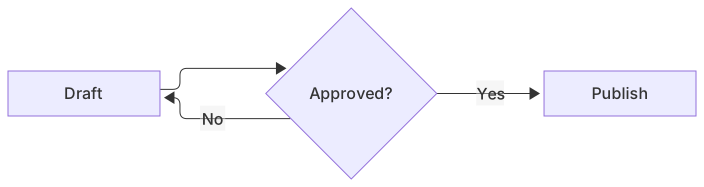
- Click Insert diagram on the toolbar to start from an example: flowchart, sequence, class, state, entity relationship, Gantt, pie chart or mind map.
- Hover a diagram and click the pencil (or double-click it) to edit the code, with a live preview.
- Drag the corner handle to resize it. Double-click the handle to go back to the natural size.
Prosedown saves the size as a comment line in the diagram, %% prosedown: width=60%. Other apps ignore it.
Printing and every export include the drawn diagram at that size: PDF and web pages as sharp vector graphics, Word as a picture.
Tip The Mermaid syntax reference covers every diagram type. The diagram editor links to it too.
Write Markdown without memorizing it.
Try it free for 14 daysProsedown shows your document styled as you type, with the Markdown one click away. This guide is built in: press F1.